
MODEL 02 / Presence / Air / Color
HALO AIR
Let the details shine.
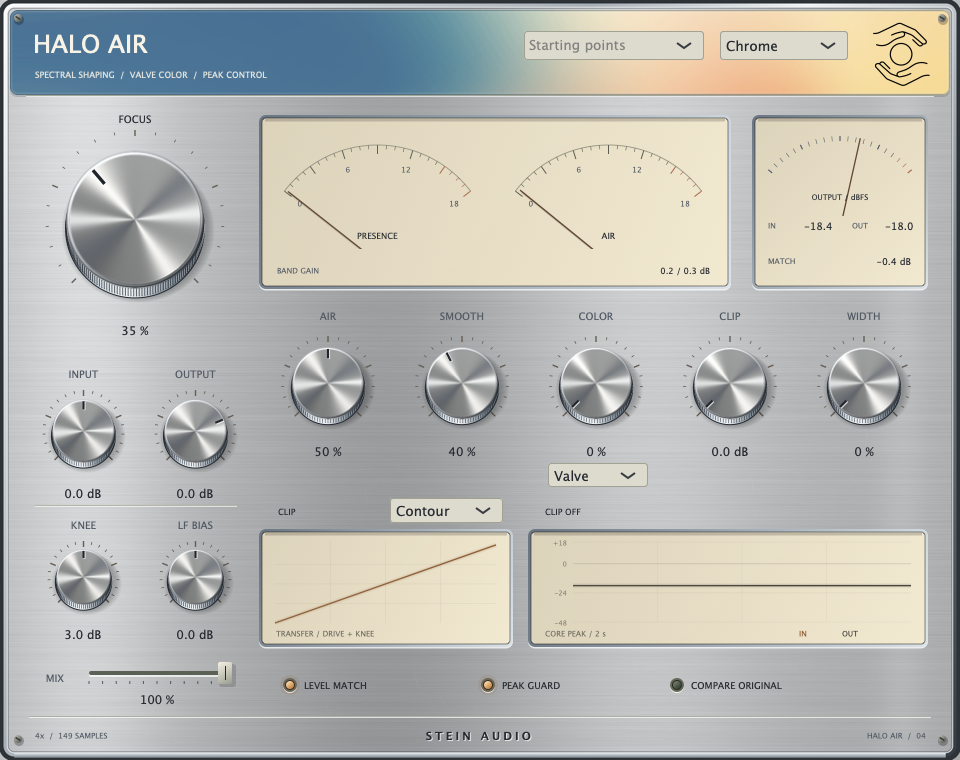
More presence. More air. A considered touch of colour for sounds that deserve the spotlight.
HALO AIR combines presence and air shaping with smoothing, harmonic colour and controlled clipping. Width expands the stereo image. Level Match supports comparison, while Peak Guard catches output peaks.
The direct comparison
Same sound.
Different feeling.
A is the original. B is the effect.
You switch. The groove keeps going.
Original pluck sketch · 124 BPM
Open top — demo setting
Press Play, then switch between A and B as the audio plays.
Active settings · version B
- Focus 50 %
- Air 80 %
- Smooth 35 %
- Color 12 %
- Clip 0 dB
- Width 0 %
- Valve
- Level Match on
- Mix 100 %
Listen to the attack and fine overtones. Air and Focus emphasise different parts of the upper spectrum.
Original, synthesised sound sketches. Rendered with the plugin engine and aligned in time. A/B levels are not individually normalised afterwards; level changes can be part of the effect. The image shows the interface; the demo settings are listed in the player.
In detail
Presence within reach
Focus, Air and Smooth balance definition, openness and smoothing.
Colour to the edge
Choose Air Color or Valve. The Contour clipper adds Knee and LF Bias controls for targeted peak shaping.
Decide in context
Mix, Width and Level Match help you judge the amount of processing. Peak Guard can be enabled independently.
- Format
- VST3
- Platform
- macOS · Apple Silicon
- Version
- 0.4.4
- Signal path
- Latency compensated
The collection is getting ready for release. Explore the sound of each plugin with our listening examples.